
 Monitoring
Child Not at School: What to Do in the First 15 Minutes
Your child is not at school and does not answer. In nine cases out of ten it is traffic, a forgotten phone or a detour with friends — and in the tenth it is the only case that matters. The task of the first fifteen minutes is not to guess, but to narrow the situation down to a fact: where, with whom, and in what state.
Three likely reasons
- Slept in or went late — left home, never reached the building.
- Skipped — deliberately did not go, and is nearby (a park, a café, a friend’s flat).
- Something happened on the way — the one case that needs an adult immediately.
What a plain location app shows — and why it is not enough
A dot on a map: “not at school”. No answer to the question that actually matters: is the child safe right now. A geofence with a schedule is already more useful — arrival 09:00, departure 16:00, allowed delay 15 minutes — because it separates “late” from “missing”.
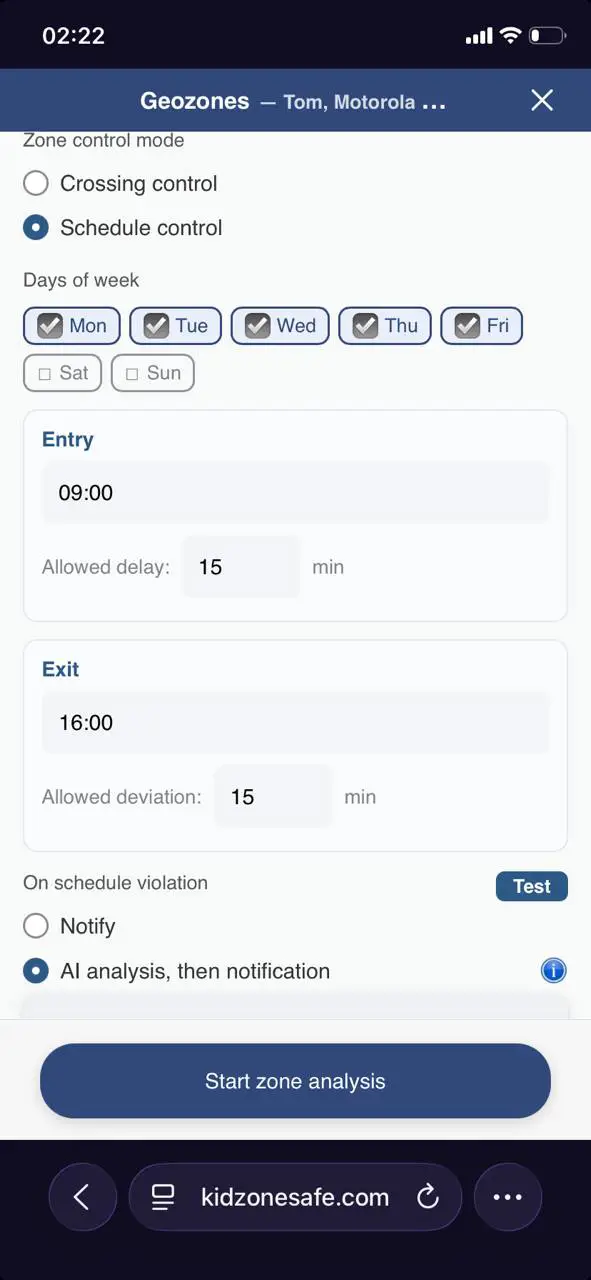
Step 1: let the zone explain itself
Instead of a dry “the child is not in the zone”, the AI explains what it sees: 699 metres from the school, not moving, level 1/10 — outside the school, listening to music, no signs of stress, conflict or suspicious contact with an adult. That is not a guarantee, but it is a reason to wait two minutes instead of calling everyone.
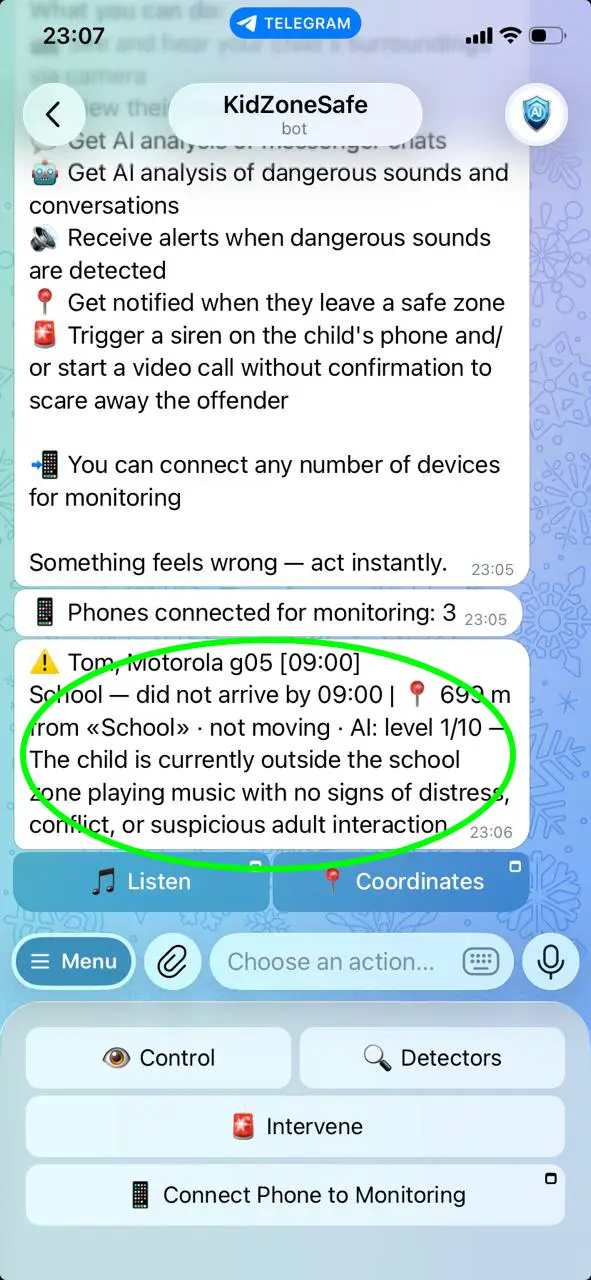
Step 2: listen to the surroundings
The phone is not answered, but it still hears. The sound detector analyses the surroundings during the parent-set hours: a classroom, a bus, a street, silence in a stairwell, a raised adult voice. This is the difference between “the child is hiding the phone” and “the child cannot answer”.
Step 3: see the screen
One tap — and the parent sees the child’s screen: the last opened app, a chat, a map with a route. If the phone is in a bag, the camera shows the room. This is verification, not spying: it lasts seconds and answers a specific question.

When to call the school and when to call the police
- School — as soon as you know the child is not in class: ask whether they were marked present, whether they left, who saw them.
- Friends’ parents — one or two calls, not ten; a mass message creates panic and noise.
- Police — if the child is not reachable, the geofence shows movement away from all familiar places, or the sounds suggest danger. Do not wait for “three days”: for a minor, a statement is accepted immediately.
How to prevent the next time
- Set zones with schedules, and an allowed delay that is honest — not zero.
- Agree on the rule: “if you are late, one message”. A child who is not afraid of the reaction usually sends it.
- Check that alerts really arrive in the channel you read — a tool you have not tested is not a tool.
Common questions
Is it normal that the child does not answer? Sometimes — a dead battery, silent mode, a lesson. That is exactly why the parent needs a signal other than a call: location with a schedule, sounds, the screen.
What if the child turned the phone off? Then the last known place and the time of disconnection matter — and this is already a reason to call the school and go there.
Where are the details of the zone settings? In what an AI parental control app really detects; the rest of the cluster — child not home on time and child not answering calls.